After Installing Debian and XFCE, I got no sound. So here is the way I got sound working.
The actual issue I had wasn’t that the sound wasn’t working. It was that the sound was, by default, coming out the analog port of my computer when I was expecting the audio to play through the HDMI port. So I needed a way to change the default playback device.
So I first got a list of my audio devices by typing
pacmd list-sinks | grep -e 'name:' -e 'index:'This gave me the below

The device with the ‘*’ next to it is the default one, and as you can see, it’s the analog device. We need to change it to the HDMI device which is index 0. First, let’s make note of the entire name of the HDMI device, which is alsa_output.pci-0000_00_03.0.hdmi-stereo. Now to set it as the default type:
pactl set-default-sink 'alsa_output.pci-0000_00_03.0.hdmi-stereo'Re-running pacmd list-sinks | grep -e ‘name:’ -e ‘index:’ will now show my HDMI device as the default. To test the changes, I install Banshee (a Linux media player) to see if, by default, it plays over HDMI. The changes worked and I didn’t have to restart or log out for the changes to take effect. I did read that you should log out and back in, so try that if the changes don’t work right away for you.
So that’s how I got my audio working the way I wanted. If you want to read about the actual process and the headaches I went through to get to this point, keep reading further.
The actual adventure
I read that PulseAudio is what controls the audio in a Linux desktop so the first thing I did was check to see if I had PulseAudio installed. So I ran
sudo apt-get install pulseaudio…and it turns out pulseaudio is already installed. In the pulseaudio documentation, it said that there was an app called pavucontrol that would let me make volume adjustments. I run it from a terminal by just typing
pavucontrolRunning that gives me the below
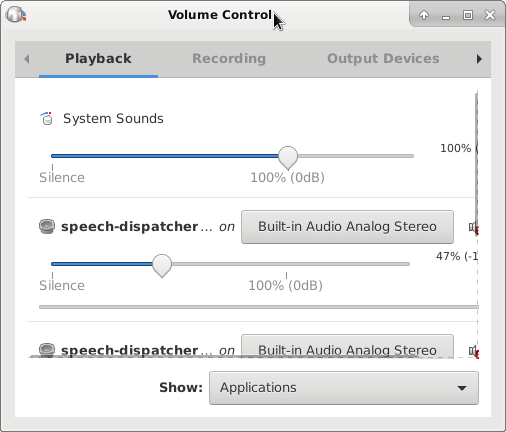
I see that the outputs are set to “Built-in Audio Analog Stereo.” I want the audio to play through HDMI. Before I try to get audio over HDMI, I decided to get some headphones and test the analog output first.
With headphones on, I click on the volume sliders to see if I hear any alert sounds like I would in Windows. No sounds play, so I try playing a video from a web browser.
That worked! Now to switch the output to HDMI, I go back to the pavucontrol app. If I press the buttons that say “Built-in Audio Analog Stereo” I see another option saying “Built-in Audio Digital Stereo HDMI.” There are three places where I can change it, so I change all of them.
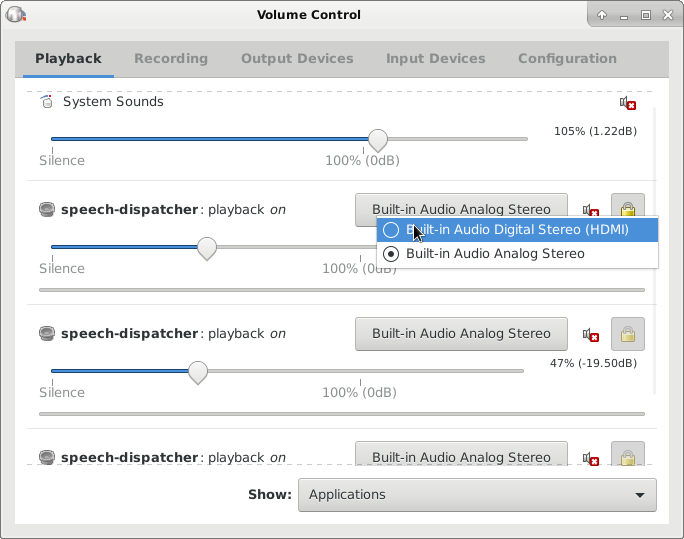
I now get audio over HDMI but the issue with switching those volume sliders to HDMI is that those sliders were for individual applications that were open. I had no idea that pavucontrol was a mixer. Making changes to those sliders would actually change the default device for the individual application, but it wont change the default for the entire system.
Doing some more digging, I found out how to set the system wide default audio device. In a terminal window type:
pacmd list-sinks | grep -e 'name:' -e 'index:'This will list all available audio devices.
The device with a ‘*’ next to index is the default. You can see that the analog audio is my default device. I’m going to make note of all the text inside the “<” and “>” for my HDMI’s output, which is alsa_output.pci-0000_00_03.0.hdmi-stereo in index: 0. I will need it later.
Now I have to edit pulse’s default.pa file located at /etc/pulse/default.pa. I open up that file in nano. Scroll down to the section that says ### Make some devices default. To me, it was all the way at the bottom.
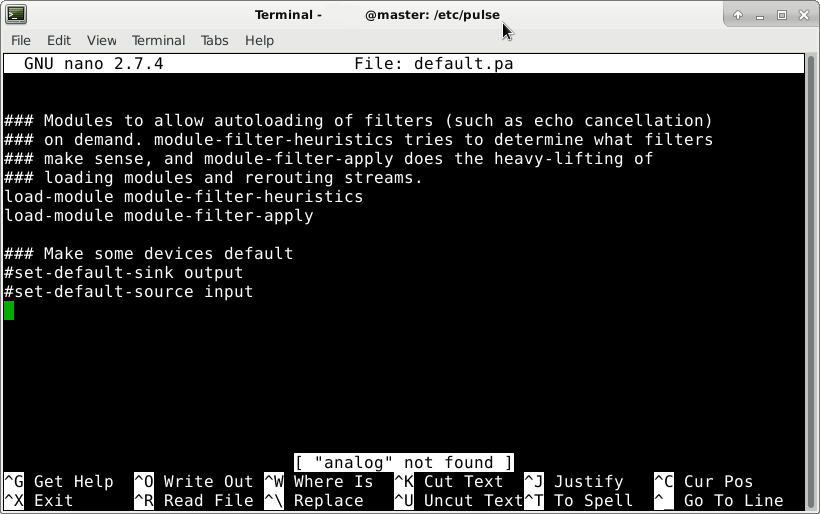
I’m going to change the line #set-default-sink output to set-default-sink output alsa_output.pci-0000_00_03.0.hdmi-stereo
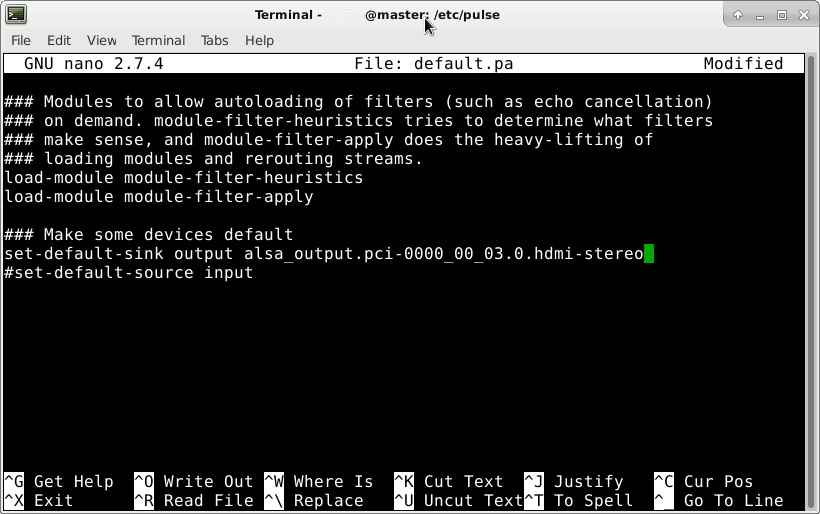
Now I’ll exit and save my changes. For the changes to take effect, I read that you just have to log out and back in or restart the pulseaudio daemon. Since I’m trying to get better at Linux, I’ll restart pulseaudio.
Just to test, I try VLC before restarting pulseaudio to see if I get audio over HDMI. I don’t but I do over analog. Now I’ll restart pulseaudio by typing:
pulseaudio -k
pulseaudio --start
I open up VLC and play an MP3 and still get no audio over HDMI, but get audio over analog. So now, I decide to log out and back in.
I open up VLC and play an MP3 again. It still plays over analog. Maybe since I opened up VLC before the changes to default.pa it kept the default to analog for VLC. I’ll download another audio application to so if the defaults take place. I decide to install mplayer and it’s the same thing. Audio still plays over analog. I even restart the computer and the applications still play over analog as default.
Running pacmd list-sinks | grep -e ‘name:’ -e ‘index:’ still lists analog as the default also.
So I find some other documentation on changing the default audio device. I type:
pactl set-default-sink 'alsa_output.pci-0000_00_03.0.hdmi-stereo'To see if it works, I run the command to check the defaults (pacmd list-sinks | grep -e ‘name:’ -e ‘index:’) and it works! The hdmi is not the default!
I open up VLC without logging out and it played through HDMI! Let me download another app that has audio. I decide to install Banshee a test with it. It works! Now the final test is if the changes still take effect after restarting.
The changes still take effect and I’m done with audio!

 Lu's Tech Source